Upon completion of this Google Sites Lesson, you will be able to:
- Start Google Sites.
- Understand the elements of the editor window.
- Rename a presentation.
- Navigate through a website.
- Change views.
- Use the Editor options in the right pane.
- Use the Ribbon.
- Adjust header
- Add website logo
- Add new pages
- Add subpages
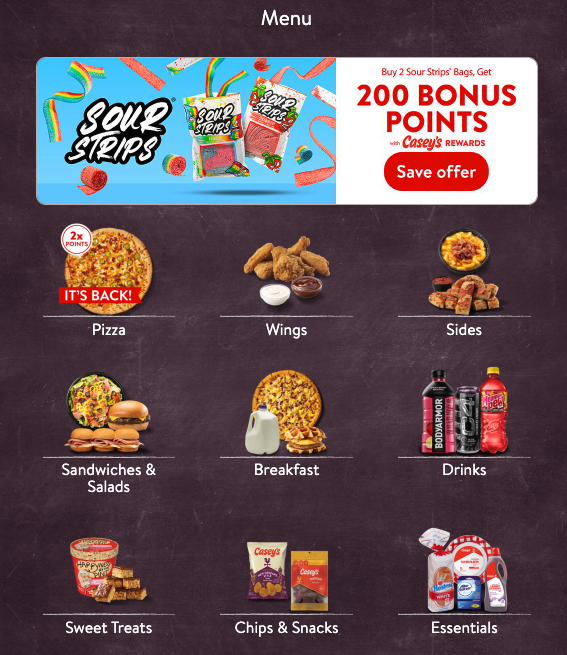
Project 4-1
- Open the Caseys Google Site from the Data Files.
- Navigate to the Menu page.
- Use the same header image as the homepage unless otherwise specified.
- Use the same text features as your textbook listed below and images from your Lesson 4 folder:
- Text Features
- Headings: Font: Bitter Bold, Size: 21, Alignment: Left, Color: Black
- Body Text: Font: Bitter, Size: 11, Alignment: left, Color: Black
- Images
- Breakfast
- Chips & Snacks
- Drinks
- Essentials
- Pizza
- sandwiches salads
- Sides
- Sour Strips Deal
- Sweet Treats
- Wings
- Text Features
- Design the page to look like this, which does not mean downloading this image and importing it. Resize images and textboxes as needed to make it look as close to the image below as possible. Design the page with the different options to make it look like this:
Project 4-2
- Open the Caseys Google Site from the Data Files.
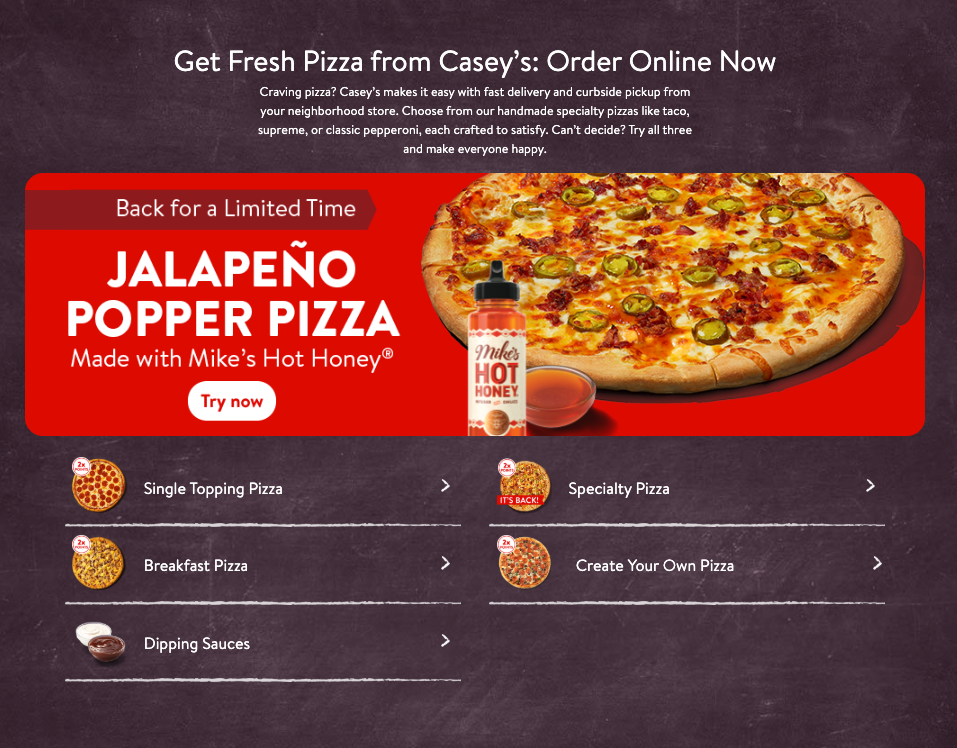
- Navigate to the Pizza page.
- Use the same header image as the homepage unless otherwise specified.
- Use the same text features as your textbook listed below and images from your Lesson 4 folder:
- Text Features
- Headings: Font: Bitter Bold, Size: 21, Alignment: Left, Color: Black
- Body Text: Font: Bitter, Size: 11, Alignment: left, Color: Black
- Images
- Breakfast Pizza
- Create Your Own
- Dipping Sauces
- Jalapeno Poppers Menu Deal
- Single Topping Pizza
- Specialty Pizza
- Text Features
- Design the page to look like this, which does not mean downloading this image and importing it. Resize images and textboxes as needed to make it look as close to the image below as possible. Design the page with the different options to make it look like this:
Project 4-3
- Open the Caseys Google Site from the Data Files.
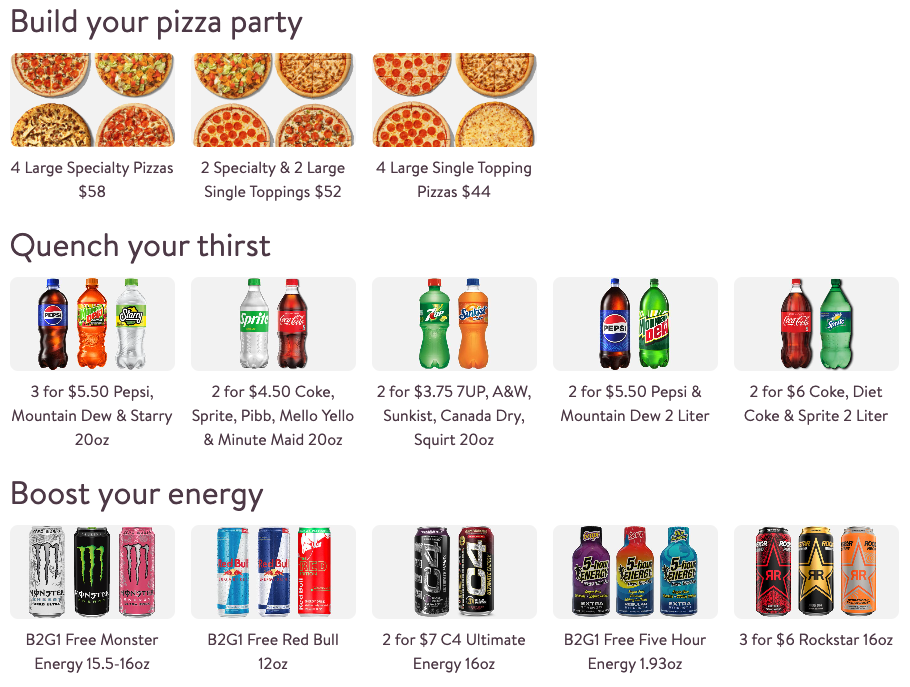
- Navigate to the Deals page.
- Use the same header image as the homepage unless otherwise specified.
- Use the same text features as your textbook listed below and images from your Lesson 4 folder:
- Text Features
- Headings: Font: Bitter Bold, Size: 21, Alignment: Left, Color: Black
- Body Text: Font: Bitter, Size: 11, Alignment: left, Color: Black
- Images
- 2 for 3.75
- 2 for 4.50
- 2 for 5.50
- 2 for 6.00
- 2 Specialty
- 3 for 5.50
- 4 Large Single
- 4 Large Specialty
- 5 hour
- C4
- Free Monster
- Free Red Bull
- Rock Star
- Text Features
- Design the page to look like this, which does not mean downloading this image and importing it. Resize images and textboxes as needed to make it look as close to the image below as possible. Design the page with the different options to make it look like this:
Project 4-4
- Open the Caseys Google Site from the Data Files.
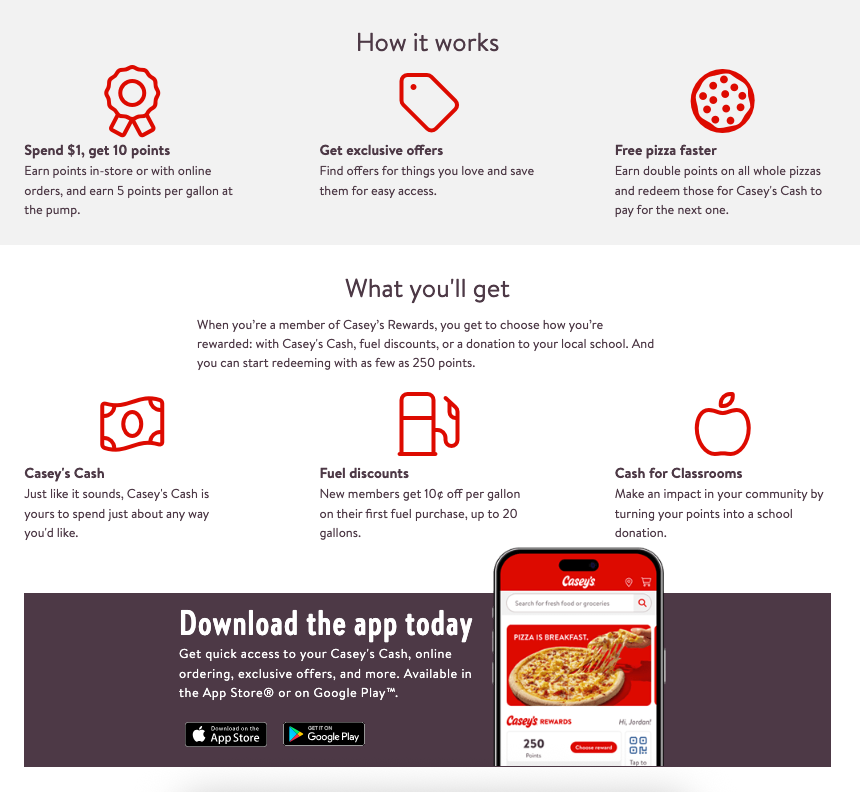
- Navigate to the Rewards page.
- Use the same header image as the homepage unless otherwise specified.
- Use the same text features as your textbook listed below and images from your Lesson 4 folder:
- Text Features
- Headings: Font: Bitter Bold, Size: 21, Alignment: Left, Color: Black
- Body Text: Font: Bitter, Size: 11, Alignment: left, Color: Black
- Images
- App
- Cash
- Classroom
- Exclusive
- Fuel
- Pizza Faster
- Spend
- Text Features
- Design the page to look like this, which does not mean downloading this image and importing it. Resize images and textboxes as needed to make it look as close to the image below as possible. Design the page with the different options to make it look like this:
Project 4-5
- Open the Caseys Google Site from the Data Files.
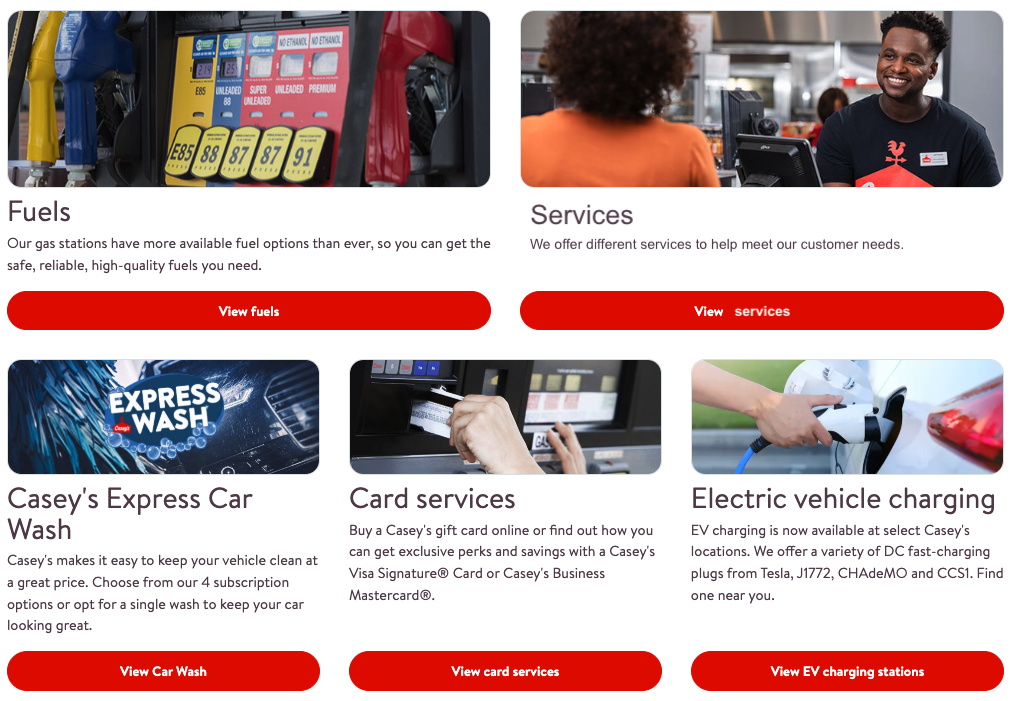
- Navigate to the Products page.
- Use the same header image as the homepage unless otherwise specified.
- Use the same text features as your textbook listed below and images from your Lesson 4 folder:
- Text Features
- Headings: Font: Bitter Bold, Size: 21, Alignment: Left, Color: Black
- Body Text: Font: Bitter, Size: 11, Alignment: left, Color: Black
- Button Links:
- View fuels: link to your Fuels page
- View services: https://www.caseys.com/terms-and-conditions
- View Car Wash: link to your Car Wash page
- View card services: https://www.caseys.com/products-and-services/card-services
- View EV charging stations: https://www.caseys.com/products-and-services/ev-charging-stations
- Images
- Car Wash
- Card
- Electric
- Fuels
- Service
- Text Features
- Design the page to look like this, which does not mean downloading this image and importing it. Resize images and textboxes as needed to make it look as close to the image below as possible. Design the page with the different options to make it look like this:
Project 4-6
- Open the Caseys Google Site from the Data Files.
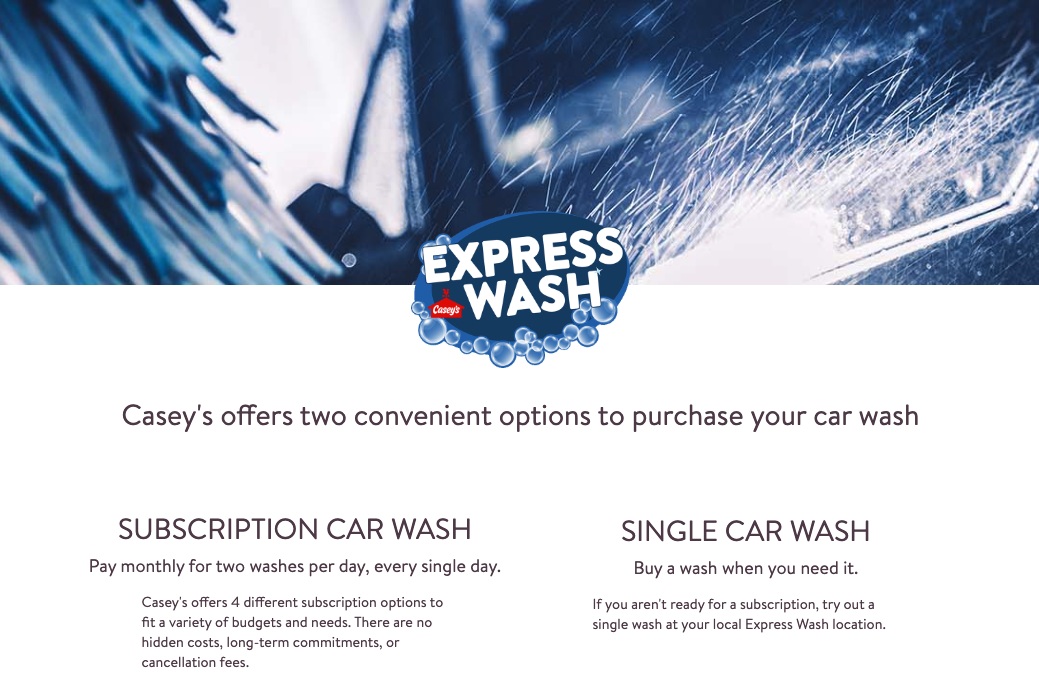
- Navigate to the Car Wash page.
- Use the same header image as the homepage unless otherwise specified.
- Use the same text features as your textbook listed below and images from your Lesson 4 folder:
- Text Features
- Headings: Font: Bitter Bold, Size: 21, Alignment: Left, Color: Black
- Body Text: Font: Bitter, Size: 11, Alignment: left, Color: Black
- Images
- Car Wash Header
- Express Wash Logo
- Text Features
- Design the page to look like this, which does not mean downloading this image and importing it. Resize images and textboxes as needed to make it look as close to the image below as possible. Design the page with the different options to make it look like this:
Project 4-7
- Open the Caseys Google Site from the Data Files.
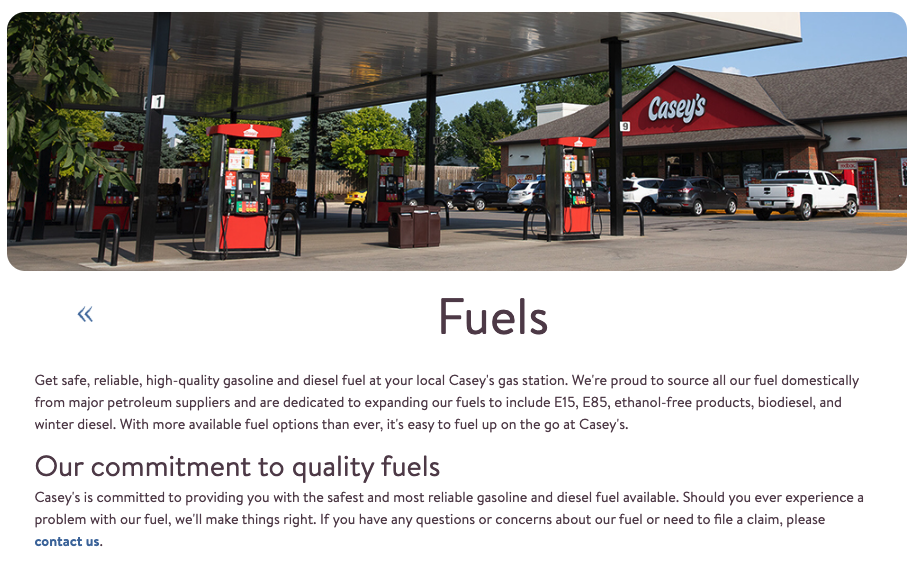
- Navigate to the Fuels page.
- Use the same header image as the homepage unless otherwise specified.
- Use the same text features as your textbook listed below and images from your Lesson 4 folder:
- Text Features
- Headings: Font: Bitter Bold, Size: 21, Alignment: Left, Color: Black
- Body Text: Font: Bitter, Size: 11, Alignment: left, Color: Black
- Images
- Fuels header
- Text Features
- Design the page to look like this, which does not mean downloading this image and importing it. Resize images and textboxes as needed to make it look as close to the image below as possible. Design the page with the different options to make it look like this:
Project 4-8
- Open the Caseys Google Site from the Data Files.
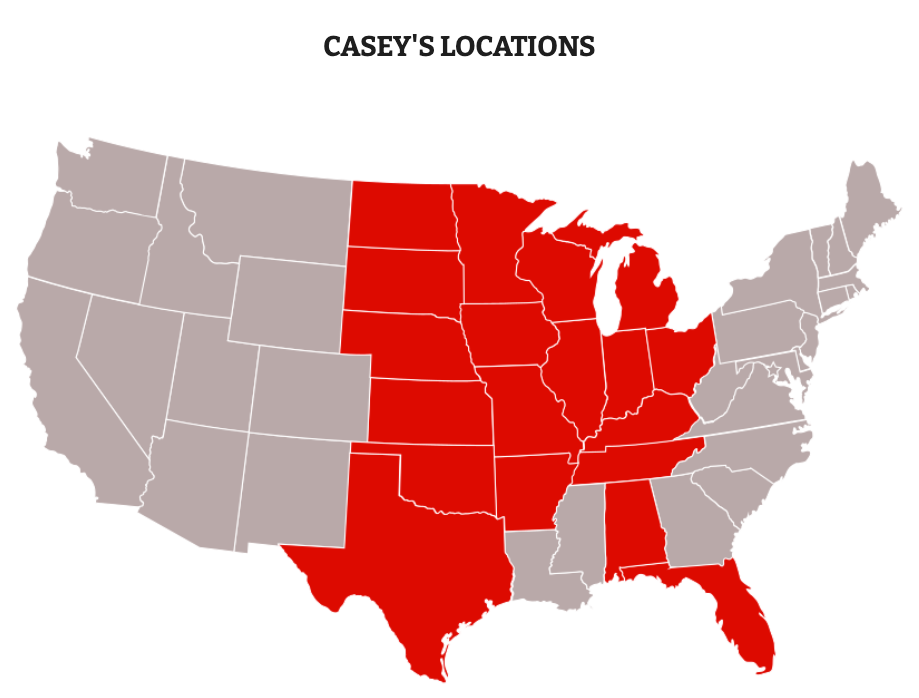
- Navigate to the Locations page.
- Use the same header image as the homepage unless otherwise specified.
- Use the same text features as your textbook listed below and images from your Lesson 4 folder:
- Text Features
- Headings: Font: Bitter Bold, Size: 21, Alignment: Left, Color: Black
- Body Text: Font: Bitter, Size: 11, Alignment: left, Color: Black
- Images
- Locations Map
- Text Features
- Design the page to look like this, which does not mean downloading this image and importing it. Resize images and textboxes as needed to make it look as close to the image below as possible. Design the page with the different options to make it look like this:
Project 4-9
- Open the Caseys Google Site from the Data Files.
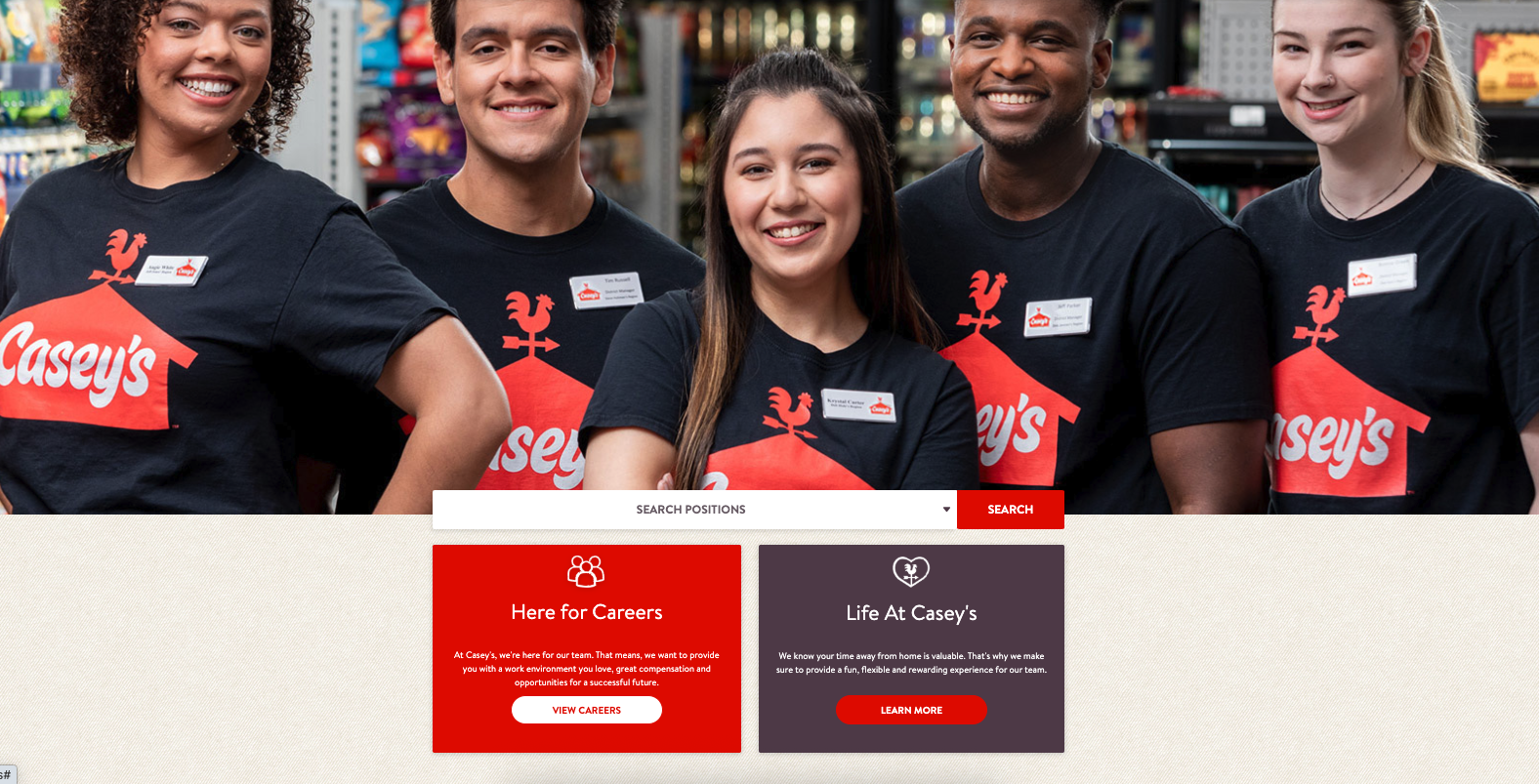
- Navigate to the Careers page.
- Use the same header image as the homepage unless otherwise specified.
- Use the same text features as your textbook listed below and images from your Lesson 4 folder:
- Text Features
- Headings: Font: Bitter Bold, Size: 21, Alignment: Left, Color: Black
- Body Text: Font: Bitter, Size: 11, Alignment: left, Color: Black
- Images
- CareersHeader
- Here for Careers
- Life at Caseys
- Text Features
- Design the page to look like this, which does not mean downloading this image and importing it. Resize images and textboxes as needed to make it look as close to the image below as possible. Design the page with the different options to make it look like this:
Project 4-10
- Open the Caseys Google Site from the Data Files.
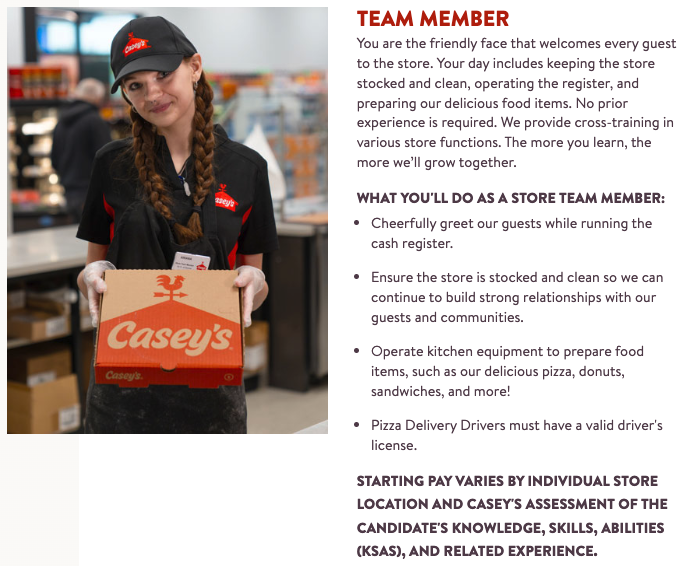
- Navigate to the Team Member page.
- Use the same header image as the homepage unless otherwise specified.
- Use the same text features as your textbook listed below and images from your Lesson 4 folder:
- Text Features
- Headings: Font: Bitter Bold, Size: 21, Alignment: Left, Color: Black
- Body Text: Font: Bitter, Size: 11, Alignment: left, Color: Black
- Images
- Team Member
- Text Features
- Design the page to look like this, which does not mean downloading this image and importing it. Resize images and textboxes as needed to make it look as close to the image below as possible. Design the page with the different options to make it look like this:
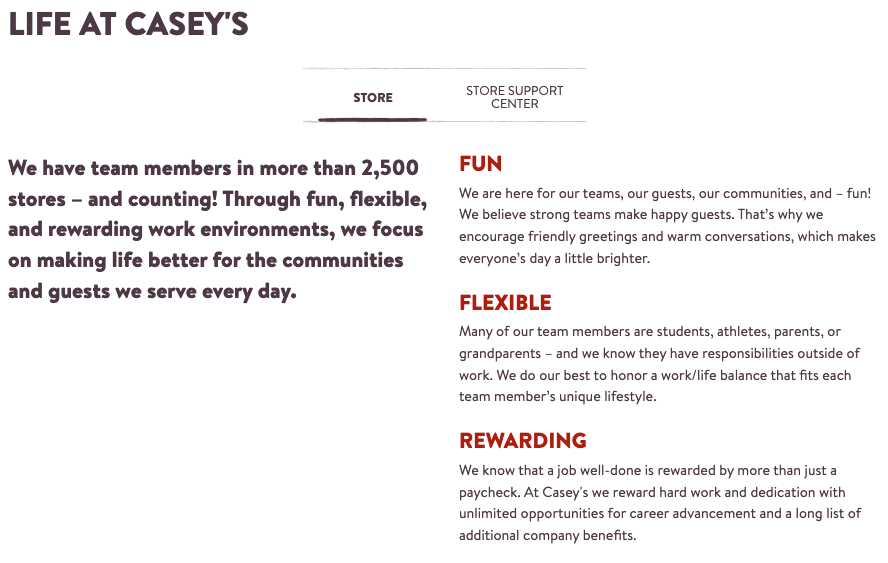
Project 4-10
- Open the Caseys Google Site from the Data Files.
- Navigate to the Life at Caseys page.
- Use the same header image as the homepage unless otherwise specified.
- Use the same text features as your textbook listed below and images from your Lesson 4 folder:
- Text Features
- Headings: Font: Bitter Bold, Size: 21, Alignment: Left, Color: Black
- Body Text: Font: Bitter, Size: 11, Alignment: left, Color: Black
- Images
- Life at Caseys
- Text Features
- Design the page to look like this, which does not mean downloading this image and importing it. Resize images and textboxes as needed to make it look as close to the image below as possible. Design the page with the different options to make it look like this: