Upon completion of this Gmail Lesson, you will be able to:
- Start Gmail.
- Understand the elements of the Gmail window.
- Open an existing email.
- Create a new email.
- Navigate through a Labels.
- Change views.
- Create a new label.
- Use the toolbar and shortcut buttons.
- Send unwanted emails to Spam
- Attach files to an email.
- Delete a emails.
- Change the Gmail settings
- Exit Gmail
Project 7-1
- In your Gmail folder, create a new Google Document titled My Resume-(Your Initials).
- Prepare your document as a resume that looks similar to this Resume Template and contains the following requirements:
- Heading: Font: Arial, Effects: Bold, Font Size: 18, Alignment: Centered
- Section Headings: Font: Arial, Effects: Bold, Font Size: 12
- Body: Font: Arial, Font Size: 12
- Margins: 1″ all the way around
- Orientation: Portrait
- Tab Stops: Headings: Left indent, Body Text: 1.5″ left tab stop, Dates: 6.5″ right tab stop
- In your document, prepare a resume for yourself assuming the following:
- Heading: use your personal information, home address, school email, and this phone number (712) 754-1234
- Education: use University of Sibley, Sibley, IA, Bachelor of Science in (choose your major), Graduation Date (May of the current year)
- Work Experience: come up with two different jobs that would help prepare you for your dream job that could be found in our local NW Iowa area. Use Google to identify the things that person would do at that workplace to complete this section
- Qualifications: using the research results from your work experience, list some skills that a person in this field would need to perform this job
- Once you are finished with your resume, type the email below and CC your instructor and attach your resume from your Google Drive folder.

- Make sure your email includes the following:
- To yourself
- CC teacher
- Add your own signature at the end of the email using the Gmail settings
- Request a read receipt for this email
Project 7-2
- In your Gmail folder, create a new Google Sheet titled Student Grades-(Your Initials).
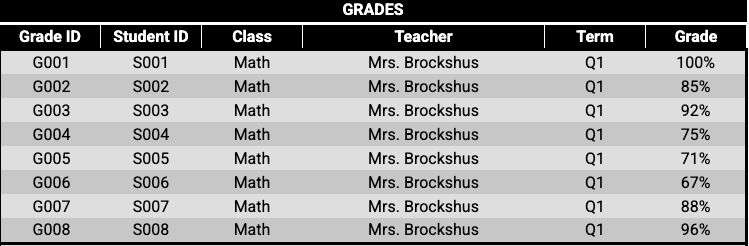
- Prepare your spreadsheet using the following information:
- Once you are finished with your spreadsheet, type an email to your instructor giving a detailed evaluation about each student, based on their student ID, regarding their grade performance in math and reading. BCC your instructor and embed your spreadsheet through Google Drive so that it is placed right below the text of your email, but before your signature.
- Make sure your email includes the following:
- To yourself
- BCC teacher
- Add your own signature at the end of the email using the Gmail settings
- Request a read receipt for this email
- Make sure your email includes the following:
Project 7-3
- In your Gmail folder, create a new Google Slides presentation titled Coca-Cola-(Your Initials).
- Using what you learned in the Google Slides lesson as well as the internet, prepare your presentation to look at close to this Coca Cola presentation as possible. This will require you to using the Drawing options, Google Image search, and customized text locations as well.
- Once you are finished with your presentation, type an email to your instructor and explain in a paragraph what your perceptions are of the Coca-Cola brand based on what the presentation information presents. Attach your presentation from your Google Drive folder.
- Make sure your email includes the following:
- To teacher
- BCC yourself
- Add your own signature at the end of the email using the Gmail settings
- Request a read receipt for this email
- Make sure your email includes the following:
Project 7-4
- In Canva, create a new project titled Concessions Ad-(Your Initials).
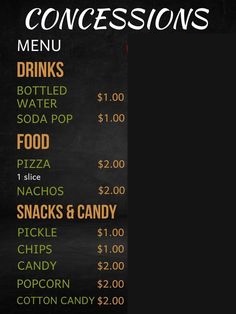
- Using what you learned in the Canva lesson as well as the internet, prepare an image that could be used as an advertisement of a local concession stand offering the items shown in the image below. The ad should visually and professional show each item being offered as well as a detailing of what it is.
- Once you are finished with your advertisement, download the image as a PNG file into your Gmail folder. Then type an email to your instructor and explain in a paragraph what four items you would most likely choose from the concession stand and explain why if those items were bought for you. Insert your advertisement from your Google Drive folder.
- Make sure your email includes the following:
- To teacher
- BCC yourself
- Add your own signature at the end of the email using the Gmail settings
- Request a read receipt for this email
- Make sure your email includes the following: